<script src="https://code.jquery.com/jquery-1.12.4.min.js" integrity="sha256-ZosEbRLbNQzLpnKIkEdrPv7lOy9C27hHQ+Xp8a4MxAQ=" crossorigin="anonymous"></script>
<script type="text/javascript" src="https://code.highcharts.com/highcharts.js" /></script>
<script type="text/javascript" src="https://code.highcharts.com/modules/exporting.js" /></script>
<script type="text/javascript">
	$.ajaxPrefilter('json', function(options, orig, jqXHR){
		return 'jsonp';
	});
	$.ajax({
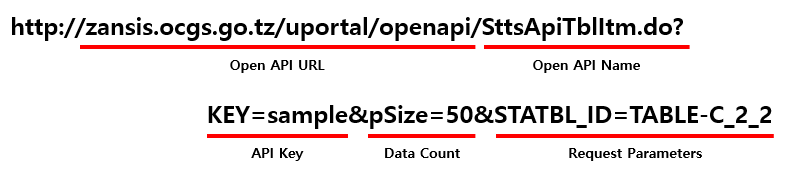
		url         : 'http://zansis.ocgs.go.tz/uportal/openapi/SttsApiTblData.do?STATBL_ID=TABLE-C_2_2&DTACYCLE_CD=YY&WRTTIME_IDTFR_ID=2024&Type=json',
		type        : 'GET',
		dataType    : 'json',
		success     : function (result) {
			drawBarChart(result);
			drawPieChart(result);
			drawGrid(result);

		},
		error       : function (result) {
		}
	});

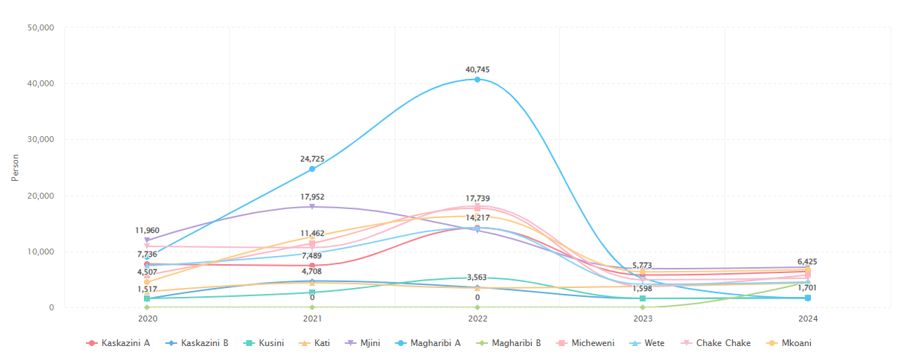
	function drawBarChart(jsonData) {
		var rows = jsonData.SttsApiTblData[1].row;
		if(rows) {
			var representativeRow = rows[0],
				statNm = representativeRow.STATBL_ID,
				itemNm1 = representativeRow.CLS_NM,
				uiNm = representativeRow.UI_NM;

			var dataArray = [];
			$.each(rows, function(idx, row) {
				var tmp = [];
				tmp.push(row.WRTTIME_IDTFR_ID);
				tmp.push(Number(row.DTA_VAL));
				dataArray.push(tmp);
			});

			$('#barChart').highcharts({
				chart: {
					type: 'column'
				},
		        credits: {
		            enabled: false
		        },
				title: {
					text: ''
				},
				xAxis: {
					type: 'category',
					labels: {
						style: {
							fontSize: '13px',
							fontFamily: 'Verdana, sans-serif'
						}
					}
				},
				yAxis: {
					min: 0,
					title: {
						text: uiNm
					},
					 labels: {
					    	formatter: function(){
					    		return commaWon(this.value);
					    	}
							/* style: { color: Highcharts.getOptions().colors[0] } */
					    }
				},
				tooltip: {
					pointFormat: '{point.y}'+uiNm
				},
				series: [{
					name: itemNm1,
					data: dataArray
				}]
			});
		}
	}
</script>

<div id="barChart" style="min-width:300px;height:400px;margin:0 auto;"></div>
<script src="https://code.jquery.com/jquery-1.12.4.min.js" integrity="sha256-ZosEbRLbNQzLpnKIkEdrPv7lOy9C27hHQ+Xp8a4MxAQ=" crossorigin="anonymous"></script>
<script type="text/javascript" src="https://code.highcharts.com/highcharts.js" /></script>
<script type="text/javascript" src="https://code.highcharts.com/modules/exporting.js" /></script>
<script type="text/javascript">
	$.ajaxPrefilter('json', function(options, orig, jqXHR){
		return 'jsonp';
	});
	$.ajax({
		url         : 'http://zansis.ocgs.go.tz/uportal/openapi/SttsApiTblData.do?STATBL_ID=TABLE-C_2_2&DTACYCLE_CD=YY&WRTTIME_IDTFR_ID=2024&Type=json',
		type        : 'GET',
		dataType    : 'json',
		success     : function (result) {
			drawBarChart(result);
			drawPieChart(result);
			drawGrid(result);

		},
		error       : function (result) {
		}
	});

	function drawPieChart(jsonData) {
		var rows = jsonData.SttsApiTblData[1].row;
		if(rows) {
			var representativeRow = rows[0], statNm = representativeRow.STATBL_ID,
				itemNm1 = representativeRow.CLS_NM,
				uiNm = representativeRow.UI_NM;

			var dataArray = [];
			$.each(rows, function(idx, row) {
				var tmp = [];
				tmp.push(row.WRTTIME_IDTFR_ID);
				tmp.push(Number(row.DTA_VAL));
				dataArray.push(tmp);
			});

			$('#pieChart').highcharts({
		        credits: {
		            enabled: false
		        },
				chart: {
	                plotBackgroundColor: null,
	                plotBorderWidth: null,
	                plotShadow: false,
	                type: 'pie'
	            },
	            title: {
	                text: ''
	            },
	            tooltip: {
	                pointFormat: '{point.percentage:.1f}%'
	            },
	            plotOptions: {
	                pie: {
	                    allowPointSelect: true,
	                    cursor: 'pointer',
	                    dataLabels: {
	                        enabled: false
	                    },
	                    showInLegend: true
	                }
	            },
	            series: [{
	                colorByPoint: true,
	                data: dataArray
	            }]
			});
		}
}
</script>

<div id="pieChart" style="min-width:300px;height:400px;margin:0 auto;"></div>
<script src="https://code.jquery.com/jquery-1.12.4.min.js" integrity="sha256-ZosEbRLbNQzLpnKIkEdrPv7lOy9C27hHQ+Xp8a4MxAQ=" crossorigin="anonymous"></script>
<script type="text/javascript">
	$.ajaxPrefilter('json', function(options, orig, jqXHR){
		return 'jsonp';
	});
	$.ajax({
		url         : 'http://zansis.ocgs.go.tz/uportal/openapi/SttsApiTblData.do?STATBL_ID=TABLE-C_2_2&DTACYCLE_CD=YY&WRTTIME_IDTFR_ID=2024&Type=json',
		type        : 'GET',
		dataType    : 'json',
		success     : function (result) {
			drawBarChart(result);
			drawPieChart(result);
			drawGrid(result);

		},
		error       : function (result) {
		}
	});

	function drawGrid(jsonData) {
		var rows = jsonData.ArcData.row;
		if(rows) {
			var html = '';
			$.each(rows, function(idx, row) {
				html += '<tr>';
				html += '	<td style="border: 2px solid gray; text-align: center;">' + row.ITEM_NAME2 + '</td>';
				html += '	<td style="border: 2px solid gray; text-align: center;">' + row.DATA_VALUE + '</td>';
				html += '</tr>';
			});
			$('#grid').append(html);
		}
	}
</script>

<table style="border: 2px solid gray; width: 700px; text-align: center;">
	<colgroup>
		<col width="50%">
		<col width="">
	</colgroup>
	<thead>
		<tr>
			<th style="border: 2px solid gray; text-align: center;">District</th>
			<th style="border: 2px solid gray; text-align: center;">Person</th>
		</tr>
	</thead>
	<tbody id="grid">
	</tbody>
</table>



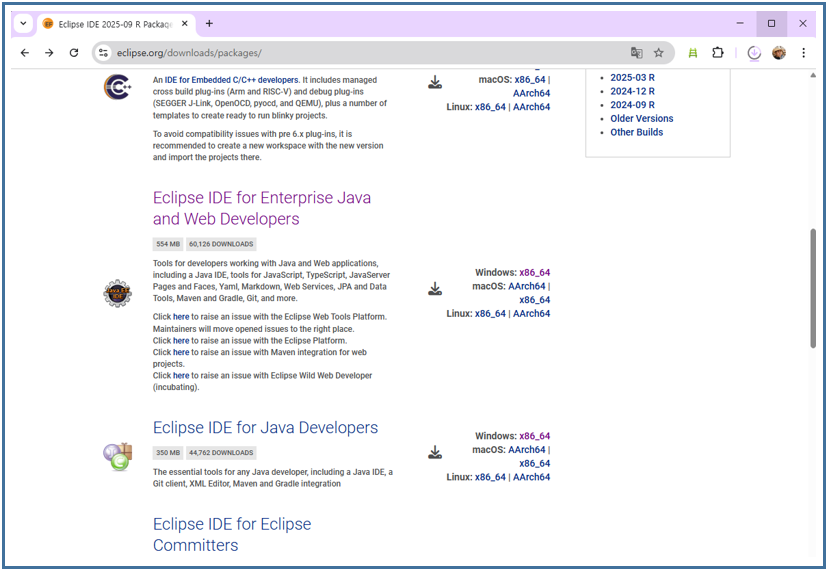
![Download [Eclipse IDE for Enterprise Java and Web Developers] and extract it.](/images/uportal/openapi/devGuideJava02.png)

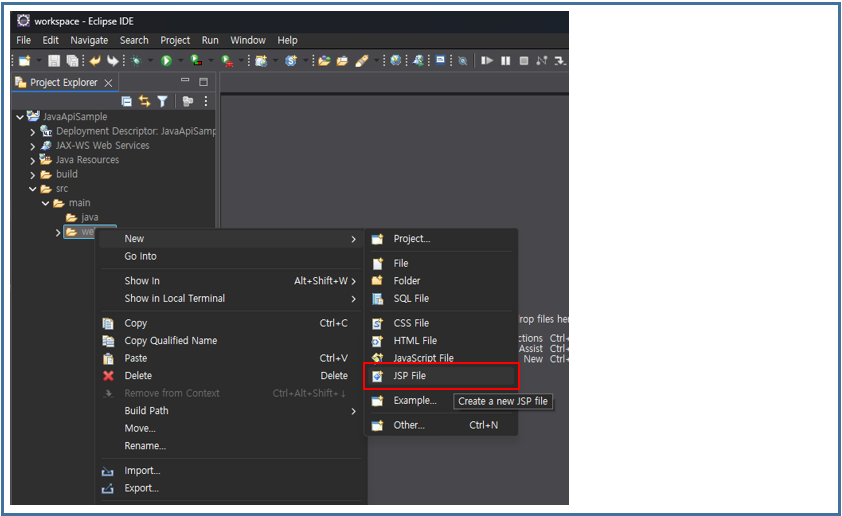
![After launching Eclipse, select [Create a Dynamic Web Project].](/images/uportal/openapi/devGuideJava04.png)

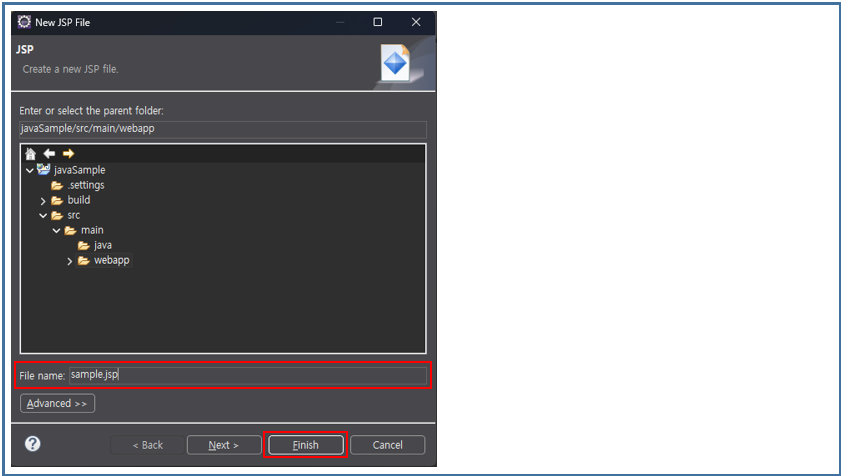
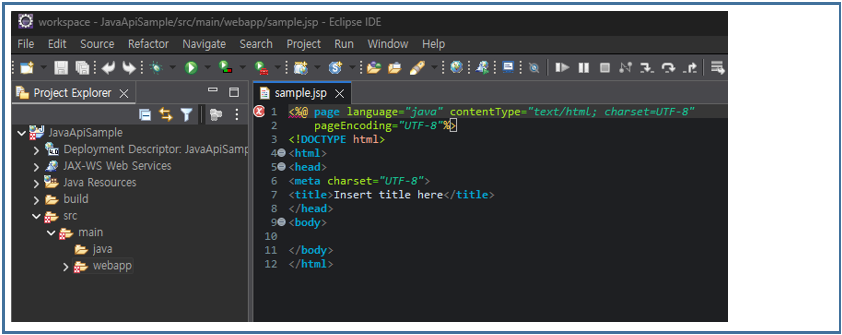
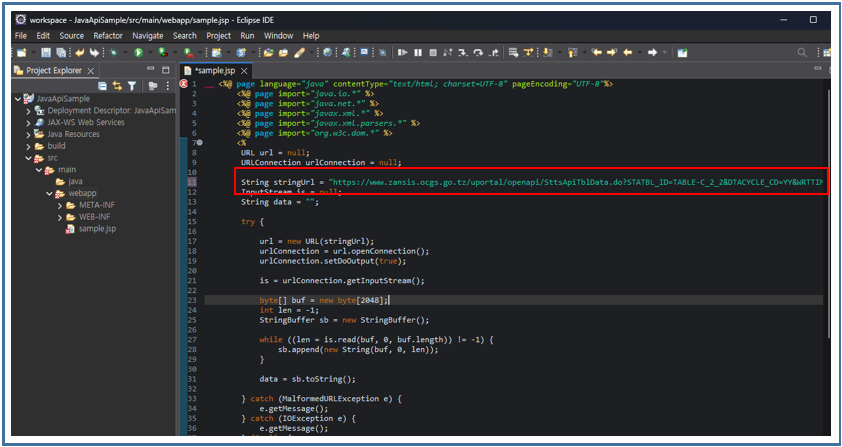

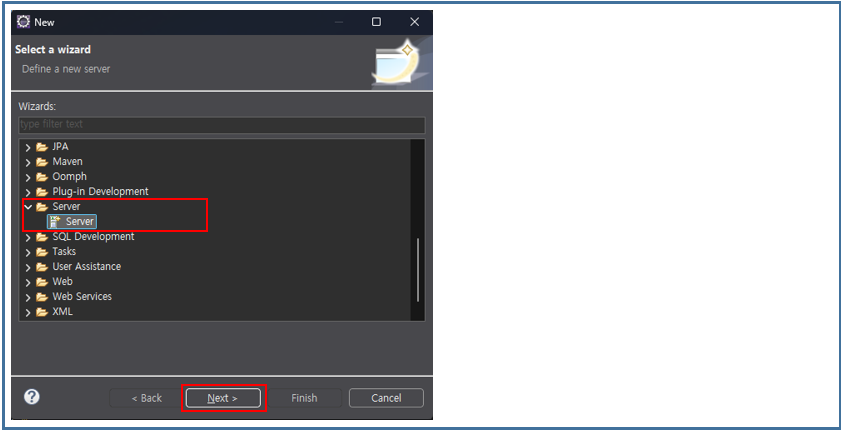
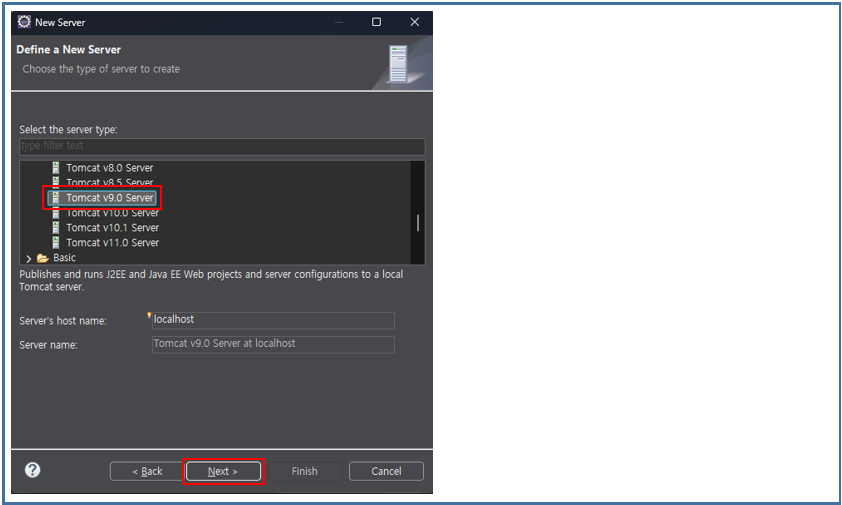

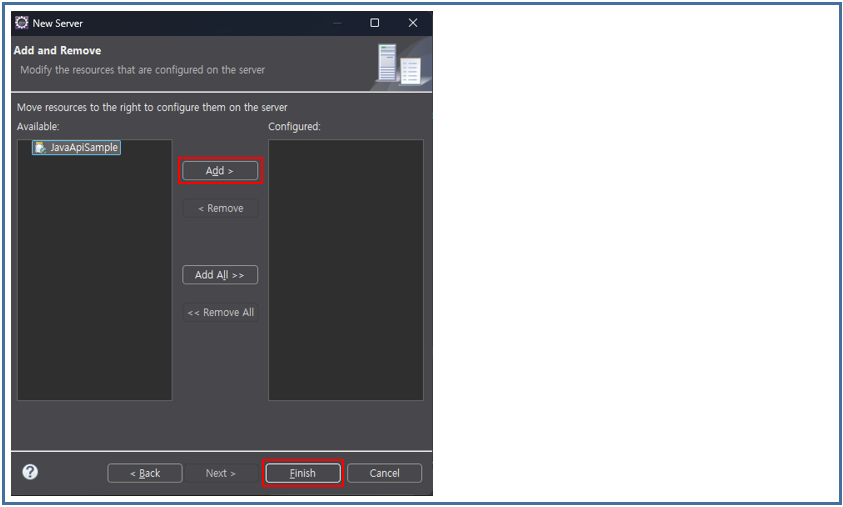
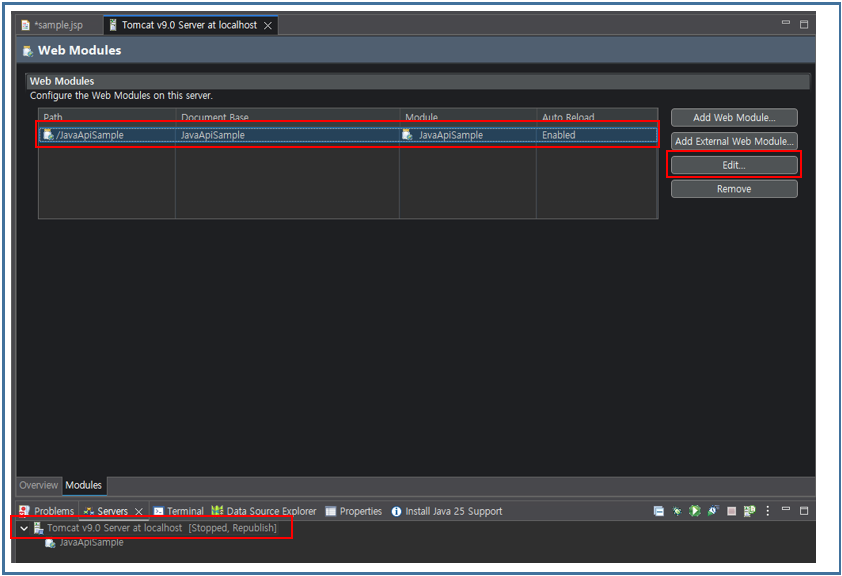
![Enter [/] in the Path field and click the OK button.](/images/uportal/openapi/devGuideJava16.png)